
Why Businesses Use Freelance Platforms — And Why Choosing the Wrong One Is Costly
Most businesses don’t wake up one day and think, “Let’s hire freelancers for fun.”
They do it because something breaks. A project is stuck. A role is suddenly urgent. Headcount is frozen. Or the in-house team just doesn’t have that specific skill.
That’s where freelance and remote talent platforms come in.
At their core, these platforms exist to solve a simple problem: speed and access. Instead of spending months hiring full-time, businesses can tap into global talent pools in days. Sometimes hours.
And on paper, it makes perfect sense. But in practice, this is where things get messy.
Why marketplaces exist in the first place
Traditional hiring was never designed for today’s pace of work.
Projects are shorter. Skill requirements change fast. Teams scale up and down constantly.
Research from Deloitte and Harvard has already shown that a significant portion of the global workforce now operates outside the traditional full-time model, with companies increasingly relying on flexible, project-based talent to stay competitive. This isn’t a trend anymore. It’s how work gets done.
- Deloitte — Managing the extended and connected workforce
- Harvard Business Review – How Flexible Hiring Models Are Redefining Workforce Resilience
So marketplaces emerged. They promised more options, faster hiring, lower commitment and global reach. And they delivered — at least partially.
The real problem: choice overload
Here’s the uncomfortable truth.
Most businesses don’t struggle to find talent. They struggle to choose correctly.
Once you land on a platform, you’re hit with:
- Hundreds (sometimes thousands) of profiles
- Conflicting reviews
- Different pricing models
- Varying quality levels
- Unclear accountability
Everything looks good on the surface. Almost everyone has a polished profile. Almost everyone claims to be an expert. And unless you’ve hired this way before, it’s hard to tell what actually matters.
Why choosing the wrong platform is expensive (even if it looks cheap)
The cost isn’t just the hourly rate.
It’s:
- Time wasted screening
- Projects delayed due to mismatched skills
- Rework from poor quality output
- Management overhead nobody planned for
- Opportunity cost when speed mattered most
A $20/hour mistake that drags on for three months is not cheap.
It’s just quietly expensive.
And this is why many businesses swear off freelance platforms entirely — not because the model is broken, but because they picked the wrong entry point.
What this guide actually solves
This guide isn’t here to convince you to “use freelancers”. You’re already here. That decision is mostly made. What this guide does is compress decision-making.
Instead of forcing you to:
- Test 10 platforms
- Read 200 reviews
- Learn through failure
We map out the freelance platform landscape clearly, so you can choose based on your situation, not marketing promises.
DECISION FRAMEWORK
How We Evaluated Freelance Platforms
There’s no best freelance platform. There’s only fit.
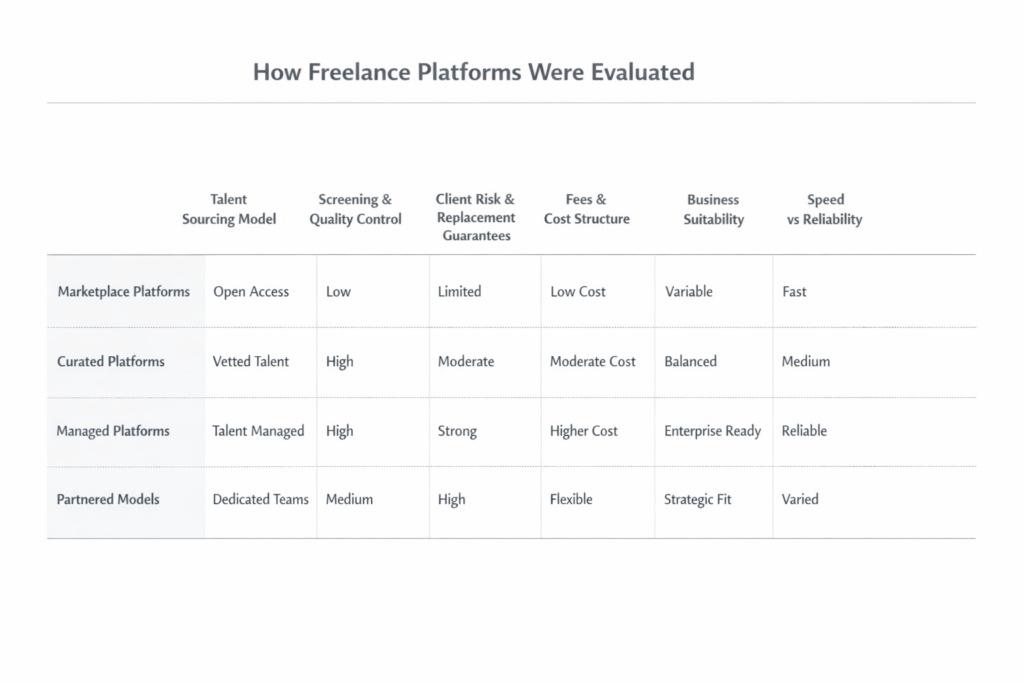
Most bad hiring experiences don’t come from “bad” platforms — they come from using the wrong model for the situation. So instead of rankings or popularity, every platform here is evaluated using the same decision lens.
If you skip this, you’ll still follow the article.
If you read it, you’ll understand why certain platforms work — and where others break.
How Platforms Are Evaluated
1. Talent sourcing model
Where the talent actually comes from.
Open access vs curated vs managed.
This answers one question: do you want access, or filtering?
2. Screening & quality control
What “vetting” really means — and whether the platform stays involved after hiring.
3. Client risk & replacement
Who absorbs failure when things go wrong: you, or the platform.
4. Fees & cost predictability
Not just price, but transparency and long-term cost.
5. Business suitability
Contracts, compliance, IP, and ability to scale beyond one hire.
6. Speed vs reliability
Every platform sits somewhere on this trade-off. There’s no free lunch.
Why This Matters
Every platform optimises for something — speed, cost, control, or quality.
Each optimisation creates a trade-off elsewhere.
This framework exists to make those trade-offs visible before you hire.
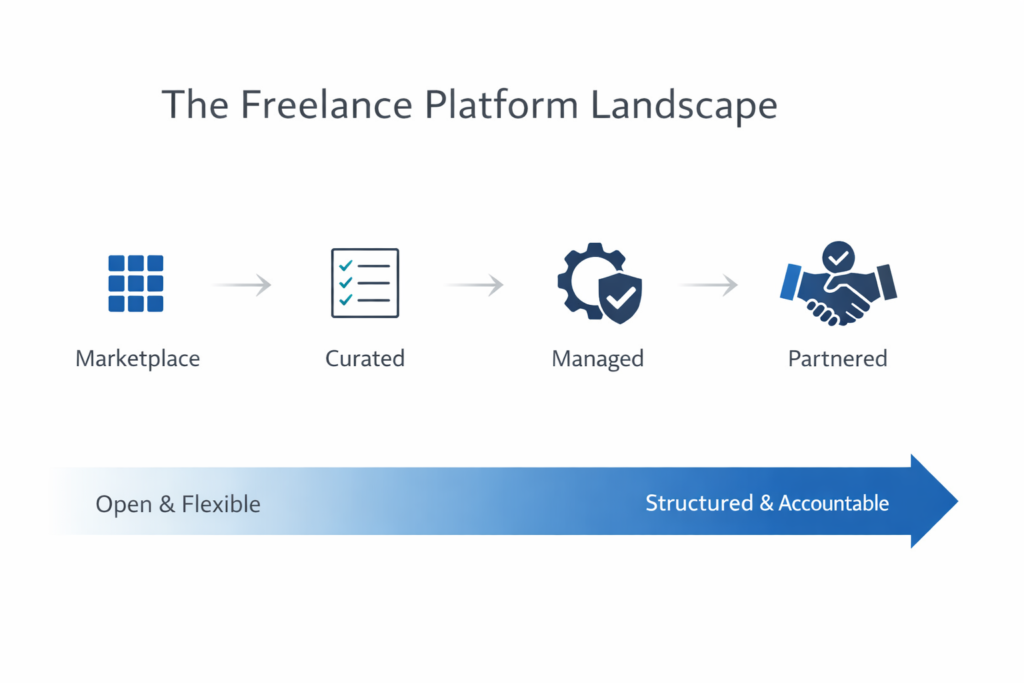
The 5 Types of Freelance Platforms (And Who Each Is For)
Before arguing about which platform is “best”, zoom out.
Most freelance platforms fall into a few categories. They behave differently because they solve different problems. Once you know the category, the trade-offs are obvious — and so is why some platforms frustrate you.
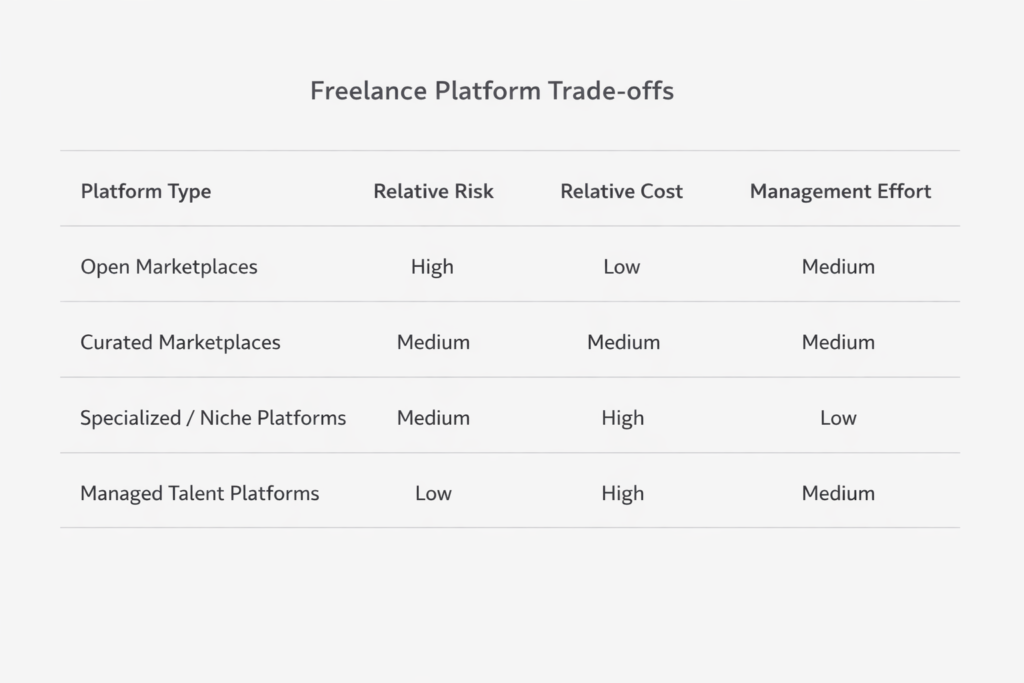
1. Open Marketplaces (Volume-First)
Anyone can join. Supply is massive.
Works when:
Speed matters, budgets are tight, and you know exactly what to look for.
Breaks when:
Roles are unclear, quality matters, or you expect the platform to manage anything.
You save money upfront.
You pay with screening, rework, and management time.
2. Curated Marketplaces
Smaller pools. Some vetting. Less noise.
Works when:
You want better signal but still want to choose and manage talent yourself.
Doesn’t solve:
Delivery risk. You still own the outcome.
Less chaos at the start. Same responsibility during execution.
3. Specialized / Niche Platforms
Focused on specific roles or domains.
Works when:
You need a precise skill and already understand the role.
Trade-off:
Depth over flexibility. Easy to outgrow if needs change.
Good for precision hiring, not broad teams.
4. Enterprise / Managed Talent Platforms
More system than marketplace.
Adds structure: account management, compliance, replacements.
Works when:
Hiring is business-critical and internal teams can’t DIY everything.
Trade-off:
Higher cost and less control in exchange for predictability.
5. When Platforms Aren’t Enough (The Bridge)
There’s a point platforms don’t handle well:
When work is ongoing.
When failure is expensive.
When outcomes matter more than individuals.
At that stage, access isn’t the problem.
Ownership is.
That’s where the conversation shifts from platforms to delivery models.
PLATFORM COMPARISON (DETAILED)
Most comparison articles fail because they chase rankings or pretend there’s a single best platform. Hiring doesn’t work that way.
This section evaluates every platform using the same lens so you can judge fit, risk, and trade-offs — not popularity.
Each platform is assessed on its own terms. A platform can be right for one use case and risky for another. That’s context, not quality.
If you’re skimming, read Best Use Case first. It eliminates most wrong options immediately.
Each platform is reviewed using the same structure: overview, strengths, limitations, fees, and best use case. No scores, no favourites, no sales pitch.
There are no “winners” because hiring isn’t a leaderboard. Platforms optimise for different things, and every optimisation creates trade-offs. This section exists to make those trade-offs visible before you feel them.
If none of the platforms fully fit, that’s expected. That’s where the discussion shifts from platforms to models — which is what comes next.
Upwork
Overview
Upwork is the largest open freelance marketplace in the world.
If you’ve ever searched “hire freelancers online”, this is usually the first platform people land on — and for good reason. Massive supply, global coverage, and almost every skill imaginable listed somewhere on the platform.
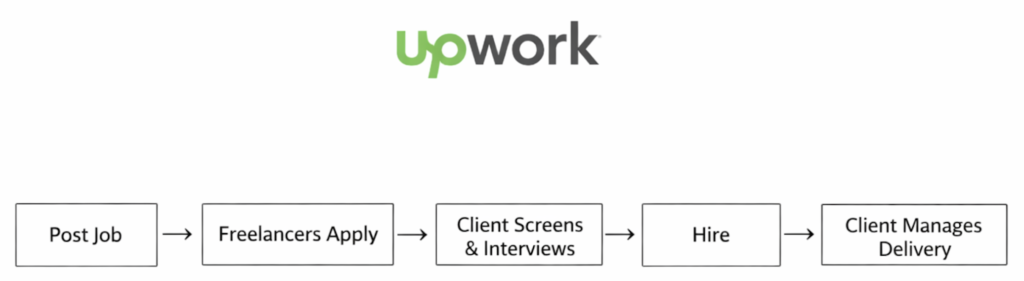
Upwork is built around self-directed hiring. You post a job, freelancers apply, you interview, you hire, and you manage everything yourself. The platform provides tooling, payments, and dispute handling — but the outcome still depends heavily on the client’s ability to evaluate and manage talent.
This makes Upwork powerful, but also unforgiving.
Process Flow
Strengths
The biggest strength of Upwork is volume.
You can find:
- Developers, designers, marketers, writers
- Junior freelancers to senior consultants
- Short-term task help or long-running contracts
Speed is another advantage. For common roles, applications can start coming in within hours. For businesses that already know exactly what they need — and know how to vet — this can be extremely efficient.
Upwork’s platform features are also relatively mature:
- Time tracking
- Milestone-based payments
- Escrow protection
- Basic dispute resolution
For experienced operators, these tools are “good enough” to run lean hiring experiments.
Limitations
Upwork does not solve quality for you.
Screening is largely marketplace-driven:
- Anyone can join
- Anyone can apply
- Signals like reviews and job success score are helpful, but imperfect
The burden of filtering, interviewing, onboarding, and ongoing management sits squarely on the client.
Another common issue is signal noise. High-volume roles often attract dozens of low-fit applications, which increases hiring friction and decision fatigue.
Upwork also struggles when:
- The role is ambiguous
- The scope is evolving
- The business lacks a clear internal owner
In those cases, mis-hires are common — and expensive.
Fees & Cost Transparency
Upwork charges clients a service fee (around 5%) on top of freelancer rates.
Freelancers also pay platform fees, which can influence pricing behaviour.
While rates appear transparent upfront, true cost often increases due to:
- Time spent screening
- Replacements
- Rework
- Management overhead
The platform is cheap only if your process is tight.
Best Use Case (Very Important)
Upwork works best for:
- Businesses with clear scopes and defined deliverables
- Teams experienced in hiring and managing freelancers
- Short-term projects, pilots, or non-core work
- Cost-sensitive experiments where speed matters
Upwork should be avoided if:
- You expect the platform to “send you the right person”
- You lack internal technical or functional reviewers
- Delivery accountability matters more than flexibility
Used well, Upwork is a sharp tool.
Used casually, it becomes a hidden tax on time and attention.
Freelancer.com
Overview
Freelancer.com is one of the oldest open freelance marketplaces around. It’s been here since before “remote work” became a buzzword, and because of that, it’s massive. Millions of freelancers. Almost every category you can think of. From logo design to hardcore backend development to odd one-off tasks that don’t even fit a job title.
On paper, that sounds great.
In reality, Freelancer.com is very much a volume-first platform. You’re not coming here because you want precision or curation. You’re coming here because you want options. Lots of them. Fast.
If Upwork feels like a structured marketplace, Freelancer.com feels more like a bazaar.
Process Flow
Strengths
The biggest strength is sheer supply.
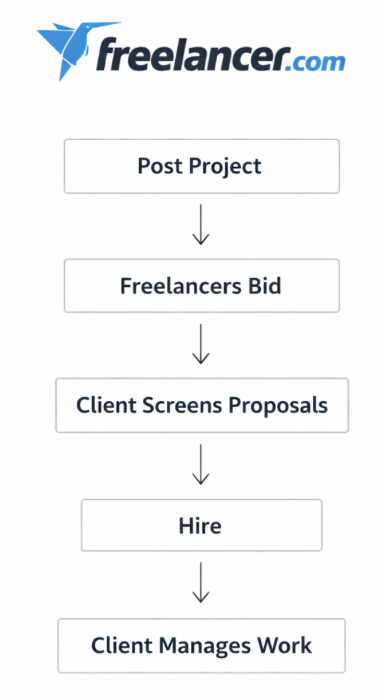
You post a job, and within minutes, proposals start coming in. Sometimes dozens. Sometimes hundreds. If you’re operating on a tight budget or testing an idea that doesn’t justify premium rates yet, this can be useful.
Another strength is flexibility. Hourly, fixed-price, contests, one-off microtasks — Freelancer.com supports all of it. That makes it attractive for businesses that don’t yet have a clear scope, or founders who are still figuring things out as they go.
Pricing is also competitive. Because the barrier to entry for freelancers is low, rates tend to skew lower than curated platforms.
Limitations
This is where the trade-off shows up.
High volume comes with high noise.
Most businesses underestimate how much time it takes to screen proposals properly. Many applicants will clearly not have read your brief. Some will oversell. Some will outsource your work without telling you. Others may simply disappear mid-project.
Quality exists on Freelancer.com — but it’s buried. You earn it by doing the work yourself: interviews, test tasks, trial periods, replacements.
There is very little protection from making a bad hiring decision beyond basic dispute mechanisms. The platform doesn’t meaningfully step in to ensure outcomes.
Fees & Cost Transparency
From the client side, Freelancer.com charges a project fee (typically around 3% or a minimum fee, depending on contract type). Freelancers pay a higher percentage, which often gets priced into their bids anyway.
The pricing is visible, but the true cost is rarely just the fee. The real cost is management time, retries, and mis-hires.
Best Use Case (Read This Carefully)
Freelancer.com works best when:
- You have internal capacity to manage freelancers closely
- You’re price-sensitive and willing to trade time for cost savings
- The task is well-defined and easy to verify
- Failure won’t materially hurt your business
It is not ideal for mission-critical work, tight deadlines, or teams that expect the platform to filter talent for them.
You don’t outsource risk here.
You absorb it.
Fiverr
Overview
Fiverr is different from most freelance platforms because it flips the model around.
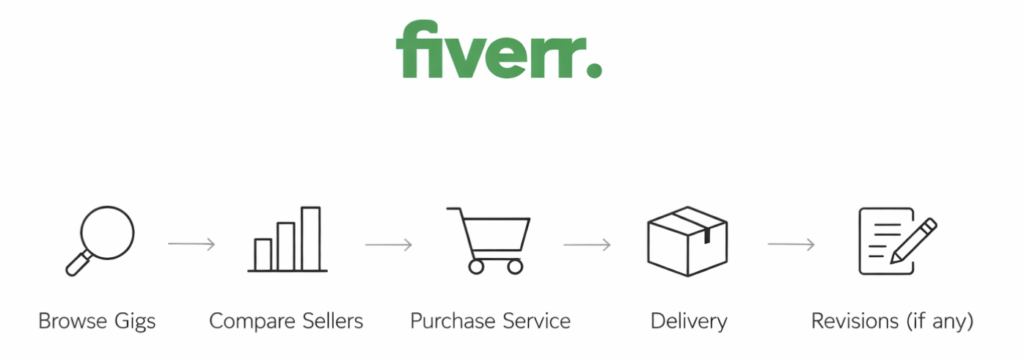
Instead of clients posting jobs and freelancers bidding, Fiverr is built around pre-packaged services. Freelancers list fixed offers (“gigs”), buyers browse, click, and buy. No long discovery process. No back-and-forth before purchase. In theory, it’s fast and simple.
That simplicity is exactly why Fiverr exploded in popularity.
But it’s also where most misunderstandings start.
Process Flow
Strengths
Speed is Fiverr’s biggest advantage.
If you need something small, specific, and non-critical done quickly — a logo tweak, a landing page copy draft, a short video edit — Fiverr lets you move almost instantly. You can see pricing upfront, compare multiple sellers side by side, and place an order within minutes.
The platform is also extremely accessible. There’s no onboarding friction, no minimum spend, and no long-term commitment. For founders testing ideas, marketers running experiments, or teams needing quick execution support, Fiverr lowers the barrier to action.
Another underrated strength: clarity of scope. Because gigs are predefined, expectations are often clearer than in open bidding environments.
Limitations
Fiverr is optimised for transactions, not relationships.
Most gigs are designed around narrow deliverables, not long-term collaboration. That makes Fiverr a poor fit for complex projects that require context, iteration, or strategic thinking.
Quality variance is also significant. Fiverr has top-rated sellers and Fiverr Pro, but the platform still heavily rewards speed and volume. Many gigs are templated. Some are outsourced again. Others look great in previews but fall apart once you scratch beneath the surface.
And while communication exists, it’s constrained. You’re buying a productised service, not hiring a teammate.
Fees & Cost Transparency
From the client side, Fiverr charges a service fee (typically around 5–6% of the order value). Freelancers pay a much higher cut, which again gets baked into pricing.
Costs are transparent upfront, which is good. But Fiverr often encourages add-ons, upsells, and revisions that can quietly push total spend higher than expected.
Cheap rarely stays cheap if scope changes.
Best Use Case (Very Important)
Fiverr works best when:
- The task is small, clear, and well-scoped
- You value speed over deep collaboration
- Output can be evaluated quickly
- You don’t need ongoing ownership or accountability
It’s not built for building teams.
It’s built for buying outcomes.
If you treat it like a vending machine, it works.
If you treat it like a hiring platform, you’ll be disappointed.
PeoplePerHour

Overview
PeoplePerHour sits somewhere between Upwork and Fiverr, but doesn’t fully behave like either.
It started as a freelancer marketplace focused on hourly work (hence the name), but over time evolved into a hybrid model — part job bidding, part pre-packaged services (“Offers”). This makes it popular in the UK and parts of Europe, especially among SMEs that want flexibility without committing to long-term hires.
It’s not flashy. It’s not aggressively marketed.
But it quietly fills a very specific gap.
Process Flow
Strengths
The biggest strength of PeoplePerHour is structure without rigidity.
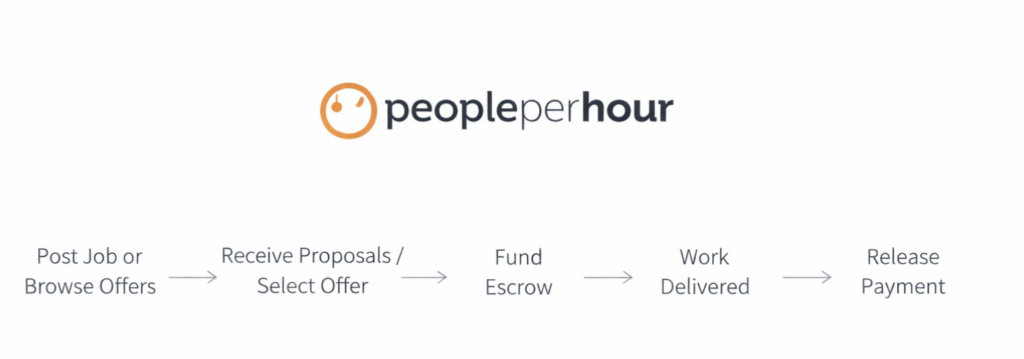
Clients can post jobs and receive proposals like a traditional marketplace, but they can also browse fixed-price offers similar to Fiverr. This dual approach helps businesses that are still figuring out what they need — or want a quick solution without writing a detailed brief.
Another advantage is its strong European talent base. If timezone alignment with the UK or EU matters, PeoplePerHour often feels more relevant than the heavily globalised pools on larger platforms.
The platform also has built-in escrow and milestone payments, which reduces payment risk compared to direct hiring.
Limitations
PeoplePerHour suffers from a classic middle-ground problem.
It’s not as deep or liquid as Upwork.
It’s not as fast or transactional as Fiverr.
That means for highly competitive roles, talent density can feel thin. And for urgent tasks, you may still need to sift through multiple proposals to find the right fit.
Quality varies significantly. While there is some screening, it’s not rigorous enough to remove noise entirely. Clients still need to evaluate portfolios, ask questions, and manage delivery themselves.
Fees & Cost Transparency
Clients typically pay a service fee (around 5%), while freelancers are charged on a sliding scale depending on lifetime billings.
Pricing is visible upfront, but like most marketplaces, actual cost depends heavily on how well the scope is defined. Vague briefs often lead to revisions, delays, or mismatched expectations.
Best Use Case (Very Important)
PeoplePerHour works best when:
- You want flexibility between fixed-price and hourly work
- You’re hiring for small to medium tasks, not building a long-term team
- EU/UK timezone alignment matters
- You’re comfortable managing freelancers directly
It’s a practical platform, not a strategic one.
Good for execution.
Not designed for ownership or accountability.
Toptal
Overview
Toptal positions itself as the opposite of open marketplaces.
Instead of giving you access to everyone, it promises access to very few — famously branding itself as a network of the “top 3%” of freelance talent. Developers, designers, finance experts, and project managers, all supposedly pre-vetted through a rigorous screening process.
Whether that “top 3%” claim is marketing or reality depends on who you ask.
But what’s not debatable is this: Toptal sells certainty.
And certainty is expensive.
Process Flow
Strengths
The biggest strength of Toptal is signal-to-noise ratio.
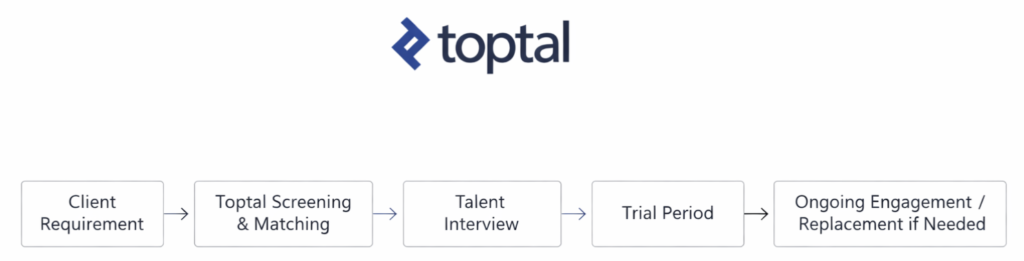
You don’t browse hundreds of profiles. You don’t shortlist manually. You don’t negotiate with ten freelancers who may or may not show up. Toptal does the sourcing, initial vetting, and matching for you.
For businesses that value time over cost, this is powerful.
Talent quality is generally consistent, especially for engineering and product roles. Communication standards are higher. Reliability is higher. And there is a replacement guarantee if things don’t work out.
For non-technical founders or lean teams, this removes a huge cognitive burden.
Limitations
Toptal is not flexible.
You don’t “shop around” freely. You don’t control the funnel. You work within their matching process. That can feel restrictive if you like being hands-on or want to explore multiple options in parallel.
Cost is another major constraint. Rates are significantly higher than open marketplaces, and there’s usually a minimum engagement expectation. This instantly filters out early-stage startups, side projects, or experimental work.
And despite the vetting, Toptal still delivers talent, not outcomes. You’re responsible for direction, management, and delivery success.
Fees & Cost Transparency
Toptal does not publish fixed pricing.
Clients typically pay hourly or monthly rates that reflect senior-level talent, plus platform fees baked into those rates. Expect costs to be meaningfully higher than marketplaces, even before considering engagement length.
You’re paying for reduced risk, not bargains.
Best Use Case (Very Important)
Toptal works best when:
- You need senior, reliable talent quickly
- The role is mission-critical
- You don’t have time to vet or manage sourcing
- Budget is less sensitive than execution risk
It’s not for experimentation.
It’s for execution with guardrails.
If you know exactly what you need and want fewer surprises, Toptal earns its place.
Gun.io

Overview
Gun.io was built as a reaction to everything that feels broken about large freelance marketplaces.
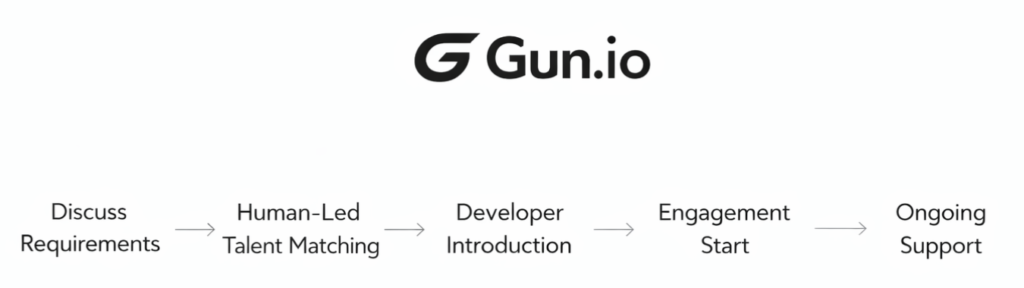
Instead of scale-first matching and automated filters, Gun.io leans heavily into human-led curation. It focuses almost entirely on software developers and technical talent, and it positions itself as a partner rather than a platform.
You don’t browse profiles.
You don’t post public jobs.
You start a conversation.
That alone tells you who it’s for — and who it’s not.
Process Flow
Strengths
Gun.io’s biggest advantage is contextual matching.
Clients speak to a real person. Requirements are discussed in detail. The platform then sources developers from its private network based on actual project needs, not keyword matching or profile tags.
This often results in better fit for complex technical work, especially where architecture, communication, and reliability matter more than speed.
Another strength is flexibility. Gun.io supports contract, contract-to-hire, and longer-term engagements without forcing rigid templates. That makes it attractive to startups and product teams that are still evolving.
Limitations
Gun.io does not scale instantly.
Because humans are involved in the matching process, speed depends on availability and fit. If you’re expecting instant options or dozens of profiles to compare, this will feel slow.
Pricing is also on the higher end. While not always as expensive as enterprise platforms, Gun.io still targets teams that value quality and reduced hiring risk over cost savings.
And like other curated platforms, Gun.io delivers talent, not delivery ownership. You still manage priorities, deadlines, and outcomes internally.
Fees & Cost Transparency
Gun.io does not publish fixed rates.
Pricing is typically based on developer seniority and engagement type, with platform fees embedded into the rate. Transparency comes through conversation, not a pricing page.
This is intentional — but it does mean budget alignment needs to happen early.
Best Use Case (Very Important)
Gun.io works best when:
- You need experienced developers for non-trivial work
- You want human judgment in the matching process
- You’re comfortable paying more to reduce hiring risk
- You don’t want to sift through candidates yourself
It’s not for speed shopping.
It’s for fit-first technical hiring.
Arc.dev
Overview
Arc.dev is a newer generation platform that feels like it was built by people who actually work remotely.
It positions itself as a remote-first talent network, focused mainly on developers, designers, and product roles. Unlike older platforms that evolved from job boards, Arc.dev was designed from day one around distributed teams, async communication, and long-term remote engagements.
Think less “freelancer marketplace”
and more “remote hiring infrastructure”.
Process Flow
Strengths
Arc.dev’s biggest strength is alignment with modern teams.
Talent on the platform is generally comfortable with remote work, long-term collaboration, and product-driven environments. This matters more than people realise. A technically strong developer who struggles with async communication can slow teams down fast.
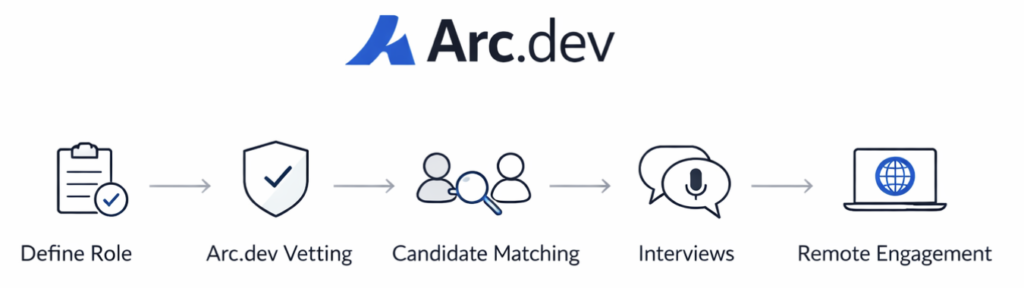
Another advantage is screening. Arc.dev does vet candidates before acceptance, which removes a lot of low-quality noise you’d see on open platforms. You’re not guaranteed perfection, but the baseline is higher.
The platform also offers flexibility in engagement models — contract, full-time remote, or contract-to-hire — making it useful for startups scaling cautiously.
Limitations
Arc.dev is still a platform, not a delivery partner.
You’re responsible for onboarding, management, prioritisation, and output quality. If your internal processes are weak, Arc.dev won’t magically fix that.
Talent depth can also vary by role. Developers are the strongest category. Other functions may feel thinner depending on timing and demand.
And while screening exists, matching is still partially system-driven. You’ll likely review candidates and conduct interviews yourself.
Fees & Cost Transparency
Arc.dev does not publicly list detailed pricing.
Rates depend on role, seniority, and engagement type. Platform fees are typically baked into the talent cost rather than shown as a separate line item.
Costs are generally higher than open marketplaces but lower than enterprise-managed platforms.
Best Use Case (Very Important)
Arc.dev works best when:
- You’re building or extending a remote product team
- You want pre-vetted talent without enterprise rigidity
- Long-term collaboration matters more than one-off tasks
- You’re comfortable managing execution internally
It’s ideal for teams who already know how to work remotely — and just need the right people.
Braintrust

Overview
Braintrust doesn’t like being called a freelance platform.
It positions itself as a decentralised talent network, built around the idea that traditional platforms extract too much value from both clients and freelancers. Instead of taking large platform fees, Braintrust uses a token-based ownership model and claims to align incentives across everyone involved.
Whether you care about the crypto angle or not, Braintrust represents a structural shift in how external talent marketplaces can work.
Strengths
The biggest strength of Braintrust is fee efficiency.
Unlike most platforms that take significant cuts, Braintrust markets itself as charging clients lower fees, while allowing talent to retain more of their earnings. For cost-conscious companies hiring senior talent, this can be attractive.
Talent quality is generally strong, especially in engineering, product, and design roles. Many freelancers on Braintrust come from big tech or well-funded startups and are comfortable working with modern teams.
Another strength is transparency. Because Braintrust emphasises community and governance, there’s more openness around how the platform operates compared to black-box marketplaces.
Limitations
Braintrust still requires effort from the client.
While there is some vetting, matching isn’t fully managed. Clients often review candidates, conduct interviews, and make final decisions themselves. This places it closer to curated marketplaces than managed platforms.
The decentralised narrative can also be distracting. Some businesses love it. Others just want talent without learning a new model or vocabulary.
And like most platforms, Braintrust provides access, not accountability. Delivery risk still sits with the client.
Fees & Cost Transparency
Braintrust is known for low client fees compared to traditional platforms.
Exact pricing can vary, but fees are typically far below the 20–30% range seen elsewhere. Rates are negotiated directly with talent, which gives clients more visibility into true cost.
That said, savings come with increased responsibility.
Best Use Case (Very Important)
Braintrust works best when:
- You want senior talent without heavy platform markups
- You’re comfortable interviewing and managing freelancers
- You value transparency and community-driven models
- You already have strong internal processes
It’s not hands-off.
It’s cost-efficient access to high-quality talent.
99designs

Overview
99designs doesn’t behave like a normal freelance platform.
You don’t shortlist designers.
You don’t interview.
You don’t hire one person and hope for the best.
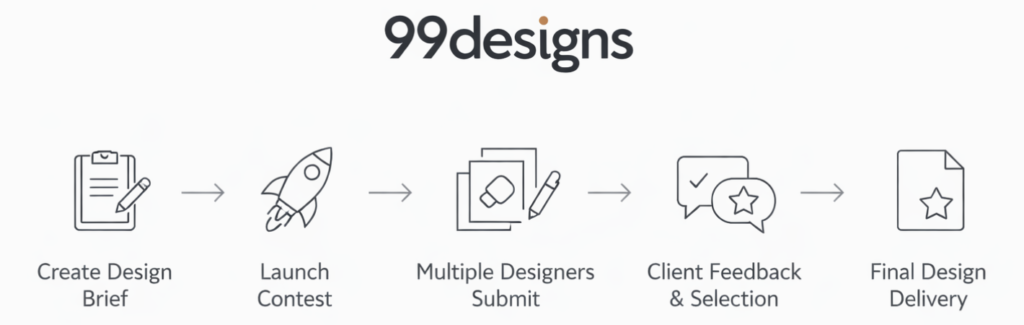
Instead, you run a design contest.
Multiple designers submit concepts based on your brief. You give feedback. You eliminate. One wins. The rest don’t get paid. It’s controversial, but it’s also why 99designs still exists and still gets used by businesses worldwide.
It solves a very specific problem — and creates a few new ones along the way.
Process Flow
Strengths
The biggest strength of 99designs is option density.
For branding, logos, or visual concepts where taste is subjective, seeing 20–50 different directions at once can be incredibly useful. You’re not betting everything on one designer’s interpretation.
It’s also beginner-friendly. You don’t need to know how to evaluate portfolios deeply. You react to what you see. That makes it appealing to founders and small businesses without in-house design expertise.
Another advantage is speed. Contests run on defined timelines, which forces momentum and decision-making.
Limitations
The contest model has trade-offs.
First, quality is inconsistent. While there are talented designers on 99designs, contests often attract volume submissions, not always depth of thinking. Many designs optimise for “first impression” rather than long-term usability or brand systems.
Second, collaboration is limited. You’re choosing outputs, not building a relationship. That makes 99designs poorly suited for ongoing design needs, product design, or anything that requires context and iteration over time.
And finally, ethical considerations aside, some designers simply avoid contest platforms entirely — which limits the talent pool.
Fees & Cost Transparency
99designs pricing is package-based.
You choose a contest tier, pay upfront, and receive submissions within a fixed period. Higher tiers unlock better designer access and support, but costs can escalate quickly.
There’s transparency in pricing, but less flexibility once the contest starts.
Best Use Case (Very Important)
99designs works best when:
- You need visual concepts, not long-term design support
- You’re early-stage and still exploring brand direction
- You value breadth of ideas over deep collaboration
- You want a defined timeline and fixed cost
It’s not a hiring platform.
It’s an idea-generation engine.
Used correctly, it can unblock decisions fast.
Used incorrectly, it becomes expensive noise.
Dribbble Hiring

Overview
Dribbble isn’t a hiring platform first.
It’s a design community.
The hiring part comes second.
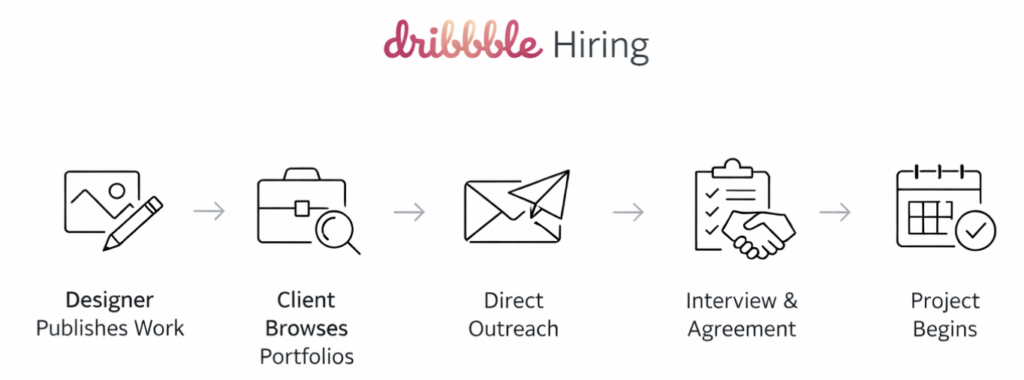
Designers use Dribbble to show work, get feedback, build reputation, and signal taste. Companies then browse that work and reach out directly. There’s no heavy matching engine. No managed process. No promises of “top X%”.
Just portfolios, taste, and judgment.
Process Flow
Strengths
The biggest strength of Dribbble Hiring is signal quality.
Design is visual. You don’t need long resumes or screening calls to know if someone’s style fits. A few shots tell you more than a thousand words. Dribbble leans fully into that reality.
You’re also accessing designers who often care deeply about craft. Many use Dribbble as a personal brand platform, not just a job board. That tends to attract people who take pride in their work.
Another advantage is directness. You reach out. You talk. You decide. There’s no platform process getting in the way.
Limitations
Dribbble offers zero protection.
No vetting. No guarantees. No escrow. No replacement safety net.
You’re responsible for evaluating skill beyond visuals, checking reliability, negotiating terms, and managing delivery. Great taste does not always equal great collaboration.
It’s also heavily skewed toward visual design. If you’re hiring for UX research, product strategy, or systems-heavy work, Dribbble alone is not enough.
Fees & Cost Transparency
Dribbble charges companies for job postings or access to talent search features.
There are no transaction fees because Dribbble doesn’t sit in the middle of payment or engagement. All commercial terms are handled directly between client and designer.
That keeps costs low — and risk high.
Best Use Case (Very Important)
Dribbble Hiring works best when:
- Visual quality and style fit matter most
- You can evaluate portfolios confidently
- You’re comfortable managing hiring and delivery yourself
- You want access to design-first talent
It’s not for safety.
It’s for taste-led discovery.
If you know what good design looks like, Dribbble is powerful.
If you don’t, it’s easy to make expensive mistakes.
Topcoder
Overview
Topcoder is not a freelance marketplace.
It’s a competition engine.
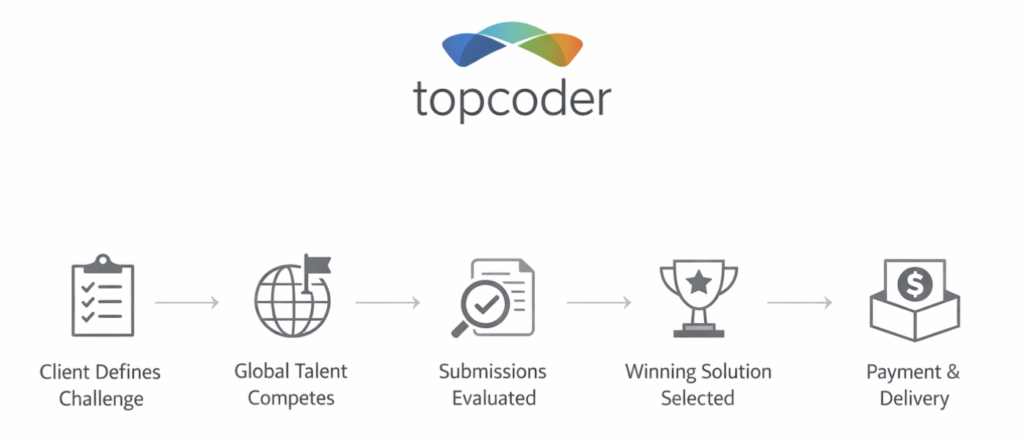
Instead of hiring one person and hoping they deliver, companies post challenges. Developers compete. The best submission wins. Payment is tied to output, not time, not promises, not interviews.
This flips the traditional hiring model on its head. You don’t bet on people. You bet on results.
That’s powerful — and limiting.
Process Flow
Strengths
Topcoder’s biggest advantage is outcome certainty.
You don’t pay for attempts. You pay for winning work. If the submission doesn’t meet requirements, it doesn’t win. That removes a huge chunk of execution risk compared to traditional freelancing.
It also attracts a specific type of talent: competitive, technically strong, and comfortable working under constraints. Many Topcoder participants enjoy problem-solving more than client communication — which, for some tasks, is exactly what you want.
For algorithmic problems, data science tasks, QA testing, and well-defined development components, Topcoder can outperform normal hiring.
Limitations
Topcoder breaks down fast when work is ambiguous or iterative.
If requirements are fuzzy, evolving, or depend on stakeholder feedback, competitions struggle. You can’t “course correct” a challenge mid-way without rework and friction.
There’s also little continuity. Winners deliver a solution, then move on. Long-term collaboration, ownership, and product context are not built into the model.
Finally, communication is minimal by design. If you need discussion, explanation, or design rationale, Topcoder can feel rigid.
Fees & Cost Transparency
Topcoder pricing is project-based.
You set prize money for challenges, and Topcoder charges platform and management fees on top. Costs are predictable per challenge, but they add up quickly if you need multiple iterations.
There’s no hourly billing. No negotiation with individuals. Everything is scoped upfront.
That clarity is both the benefit and the constraint.
Best Use Case (Very Important)
Topcoder works best when:
- The problem is clearly defined
- Success criteria are objective
- Output matters more than collaboration
- You want to minimize execution risk
It is not ideal for product discovery, creative exploration, or evolving builds.
Topcoder is a scalpel.
Not a Swiss army knife.
Use it when precision matters. Avoid it when humans need to think together.
MarketerHire

Overview
MarketerHire is not trying to be everything.
It does one thing:
on-demand marketing talent, wrapped in light process, without dragging you into enterprise sludge.
This is what “managed-lite” actually looks like when done properly.
You don’t browse thousands of profiles.
You don’t run open bids.
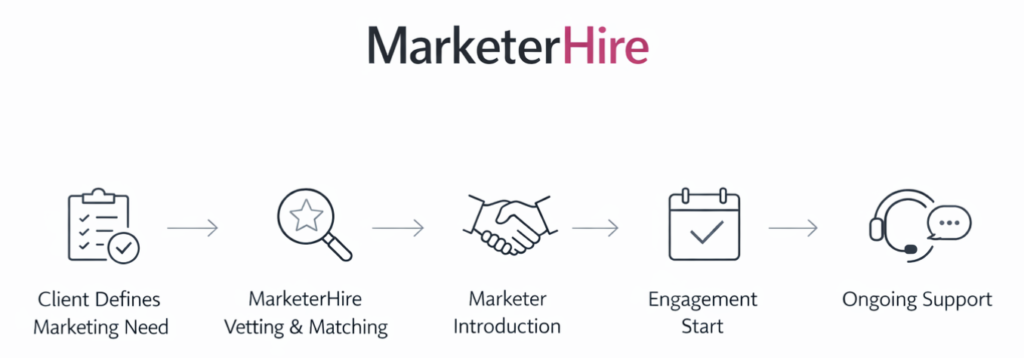
You tell them what kind of marketer you need, and they match you.
Simple. Opinionated. Narrow by design.
Process Flow
Strengths
The biggest strength is focus.
MarketerHire only deals in marketing roles — growth, performance, content, lifecycle, SEO, paid media. That specialisation shows up in the quality of matching.
Vetting is real, not checkbox-based. They screen for functional depth, not just resumes. You’re far less likely to get a “generalist pretending to be a specialist.”
The matching layer also reduces management overhead. You’re not left alone after intro — there’s light oversight, replacement support, and expectation setting.
For teams that know they need marketing help but don’t want to manage freelancers full-time, this hits the sweet spot.
Limitations
MarketerHire is not cheap, especially compared to open platforms.
You’re paying for curation, speed, and reduced risk. If cost sensitivity is your primary driver, this will feel expensive.
It’s also narrow. If your needs expand beyond marketing — design, engineering, ops — you’ll need additional platforms. There’s no cross-functional coverage.
Finally, it’s not fully managed. You still own outcomes, direction, and day-to-day collaboration. This isn’t “set and forget.”
Fees & Cost Transparency
Pricing is typically monthly and role-based.
You pay a platform fee baked into the talent rate. There’s no bidding, no hourly haggling, and no hidden upsells.
Costs are predictable, but not flexible.
You’re buying speed and fit, not bargain rates.
Best Use Case (Very Important)
MarketerHire is ideal when:
- You need marketing specialists, not general freelancers
- Speed matters more than cost optimization
- You want lower risk without full outsourcing
- You’re comfortable managing execution once matched
It’s a strong choice for startups, scale-ups, and lean teams that need marketing firepower now, not after weeks of screening.
MarketerHire is not a marketplace.
It’s a shortcut — with a price tag.
Alternative Choice in 2026
When Platforms Are No Longer Enough
At a certain scale, even the best platforms hit a ceiling.
They provide access to talent. They don’t own outcomes.
As work becomes more complex — longer timelines, multiple roles, higher stakes — the real costs show up: coordination, replacement risk, and delivery failure. “Curated” still means the risk sits with you.
This is where companies start looking beyond platform models.
Not for better freelancers — but for ownership, accountability, and continuity.
Because platforms optimise for scale. Businesses optimise for certainty.
Knowing where each model breaks is what actually matters when choosing how to hire.
Beyond Marketplaces: Who Owns the Outcome?
Marketplaces work until delivery risk becomes real.
When timelines matter, projects span multiple roles, and internal teams can’t afford to manage or replace freelancers midstream, access stops being the problem. Accountability does.
That’s where models like Hire Credible fit — not as open marketplaces, but as controlled networks where matching, oversight, and responsibility sit with the provider, not the client.
Conclusion
Freelance Platform Trends to Watch in 2026
Not trying to predict anything fancy here. This is just what’s already happening if you’ve used enough platforms over the years. More marketplaces are pushing AI screening and automated matching. It sounds impressive, but in practice it mostly makes things faster, not better. You still get good-looking profiles that don’t deliver, and real capability is still hard to judge until work starts.
Fees are also getting compressed. Platforms compete by charging less, freelancers undercut each other, and buyers feel like they’re winning. Short term, yes. Long term, quality talent drifts away and the average experience gets noisier. At the same time, compliance is becoming a bigger issue. Cross-border hiring, contracts, taxes, worker classification — none of this is getting simpler, and platforms tend to react only after problems surface.
One noticeable shift is that some businesses are no longer hiring “freelancers” at all. They’re hiring for outcomes. They care less about who does the work and more about whether it gets done properly, on time, without constant follow-ups. This model isn’t mainstream yet, but it’s slowly growing where stakes are higher.
Final Thoughts — Choosing the Right Freelance Platform
There is no universal best freelance platform. That idea only exists in marketing pages. In reality, platforms work well in certain situations and break down in others. If your scope is clear, risk is low, and you’re comfortable managing people, marketplaces can be perfectly fine. Many businesses start there for a reason.
Problems usually show up when projects become more complex. Timelines start to matter, dependencies increase, and accountability becomes blurry. At that point, it’s not that the platform is “bad”. It’s just being used for something it was never designed to handle.
Most businesses don’t fail because they chose the wrong platform. They fail because they expect a platform to solve delivery, ownership, and execution issues for them. A platform is just a tool. It gives access, not certainty.
The right choice depends on context, stage, and risk tolerance. And when your current model stops fitting, the answer usually isn’t to try harder on the same platform — it’s to change how the work gets done.